How to read Google Ads reports and what to optimize every week
By The Maplecrest Growth team · September 22, 2026 · 7 min read
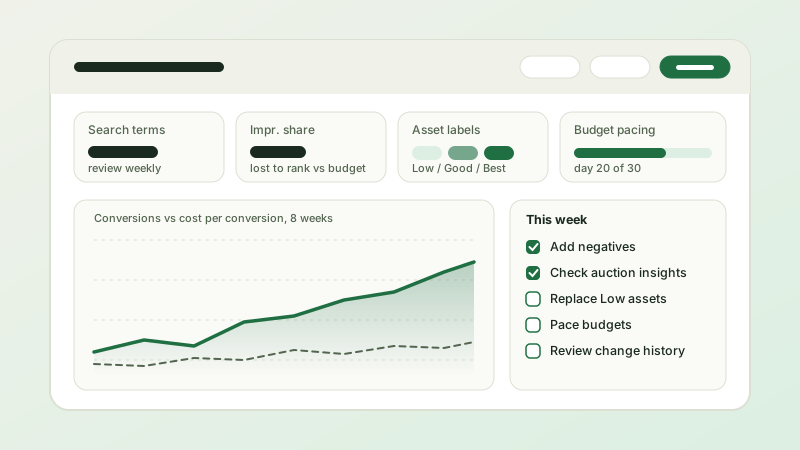
A Google Ads account produces more reports than anyone can read. The accounts that improve week after week are not run by people who read all of them. They are run by people who read a short list of reports in a fixed order, make a small number of decisions, write them down, and leave everything else alone. This is the weekly routine we use for every account we manage, and the reasoning behind each step.
Start with the one number that matters, then check that it is real
Open the account with a date range of the last seven days compared with the seven before, and look at the metric you are actually buying: cost per conversion for lead generation, conversion value and ROAS for e-commerce, cost per qualified opportunity if you import offline conversions from a CRM. Not clicks, not click-through rate, not impressions. Those explain movements in the key number; they are not the number.
Before you react to a change, confirm that the number is real. Open the conversion actions page and check that every primary action is recording, with volumes in line with your CRM or order system for the same week. Look at conversion lag: with a two-week sales cycle, last week will always look worse than it will in two weeks, so compare like with like or use the "conversions by conversion time" columns. A sudden jump in conversions is a tracking problem more often than a breakthrough. A sudden drop is a broken tag or a changed thank-you page more often than a market shift. Fixing tracking is the highest-return weekly task there is, and it comes before every other report.
Search terms report: the weekly hunt for waste and winners
The search terms report is where money leaks and where the next keyword hides. Filter to terms with spend and no conversions over the last two to four weeks, sort by cost, and ask of each whether a reasonable customer would type it. Job seekers, students, DIY researchers, other cities and other brands go into the right negative keyword list, shared across campaigns so you never fix the same leak twice. Then reverse the filter: terms with conversions that are not yet keywords get promoted to exact match in the ad group where they belong, often with a tailored responsive search ad.
In 2026 you read this report in three places. Search campaigns show it directly, with a share of queries hidden behind privacy thresholds. Performance Max shows search terms insights grouped into categories, and campaign-level negative keywords now let you act on what you find there. Search campaigns with AI Max for Search enabled report the expanded queries and the generated headlines separately. Read all three every week. The expansions are where automation drifts, and the negative list is how you steer it back.
Auction insights: who is crowding you, and whether to care
Auction insights shows which advertisers appear in the same auctions as you, with their impression share, overlap rate, position above rate, top of page rate and outranking share. Check it weekly for the campaigns that matter and look for movement rather than absolute levels. A new domain climbing fast on your core terms explains a rising cost per click better than any theory. A competitor disappearing explains why conversions were suddenly cheaper, and warns you that they may return.
Pair it with your own impression share columns. "Search lost IS (rank)" means your bids or Quality Score are not competitive; raise targets, improve ads and landing pages, or accept the position. "Search lost IS (budget)" means the campaign is being capped, which is a budget decision and belongs to the next report. Do not chase impression share for its own sake. A campaign that converts profitably at a modest impression share is healthier than one that wins every auction at a loss.
Asset reports: what to replace, and what to leave alone
Responsive search ads and Performance Max asset groups both report asset performance labels: Learning, Low, Good and Best, relative to other assets of the same type in the same place. Each week, replace assets that have carried a "Low" label for a few weeks with a genuinely new idea, not a synonym of the old one. Keep "Best" assets even if you are tired of them. Look at the combinations report for responsive search ads to see whether pinned headlines are still earning their position, and check ad strength only as a hint, never as a target.
For Performance Max, read the asset group report and the channel performance view to see where spend actually went. If most of it landed on Display or video placements with weak conversion rates, the asset groups or audience signals need work, and URL expansion and placement exclusions deserve a look. For Shopping, the equivalent weekly check is Merchant Center diagnostics: new disapprovals, price mismatches and items pending review are invisible inside Google Ads but cost sales every day they go unnoticed.
Budget pacing and the discipline of not overreacting
Google can spend up to twice a campaign's daily budget on a busy day and balances it across the month, so judge pacing on month-to-date spend against the monthly plan rather than on yesterday. Campaigns marked "Limited by budget" with a healthy cost per conversion are candidates for more money. Campaigns spending fully with poor results are candidates for a tighter target or a structural fix, not a bigger budget. Move budgets between campaigns in steps of roughly twenty percent, and change bid targets gradually, because every large change restarts Smart Bidding's learning period and muddies next week's reading.
Read the change history before you draw conclusions. If someone edited ads, added keywords or accepted a recommendation on Tuesday, Wednesday's numbers are not a trend. This is also the moment to confirm that auto-apply recommendations are still off and to review the suggestions by hand, accepting the ones with a reason and dismissing the rest.
What not to touch every week
Some things look like optimization and are actually noise. Do not change bid strategies weekly; give targets at least two to three weeks and a meaningful number of conversions before judging them. Do not rewrite ads that are still in Learning. Do not pause keywords on a week of data when the sales cycle is longer than a week. Do not accept recommendations because the optimization score went down. And do not reallocate budget by last-click ROAS alone when Demand Gen or YouTube are in the mix; look at assisted conversions and branded search volume before cutting the campaigns that fill the top of the funnel.
A good weekly session ends with a short written note: what the key number did, whether tracking is sound, which negatives and keywords were added, which assets were replaced, how budgets and targets moved and why, and what to watch next week. Over a quarter those notes become the most useful report the account has, because they explain the numbers instead of just displaying them.
Want this routine run for you, with the notes delivered every week? Weekly optimization and a standing weekly meeting are part of every engagement we offer. Tell us about your account on our contact page and we will reply within one business day.